
Bolded Reading Modus: The 2026 Buyer’s Guide to Personalised Reading Tools
Updated: Aug 2
What if the reason you're struggling to finish that long-form report isn't a lack of discipline, but a limitation of your screen's static typography? Most of us accept digital eye strain and the constant skipping of lines as an inevitable tax on our productivity. You've likely felt that familiar mental fog after an hour of scrolling through dense web content; it's a state where your brain works harder just to track the words than it does to understand the meaning. Adopting a personalized bolded reading modus isn't about changing the text itself, but about calibrating the digital interface to match how your brain actually processes visual information.
You deserve a reading experience that feels like a tailwind rather than an obstacle. In this 2026 guide, we'll show you how bolded reading technology can increase your digital reading speed by up to 35% while significantly reducing cognitive fatigue. We'll explore the transition from generic fonts to adaptive typography platforms that prioritize your visual ergonomics. You'll learn how to identify the right browser-based solutions and use a Reading Profile Test to build a workflow that leaves you feeling energized, not exhausted, at the end of every workday.
Table of Contents
Understanding Bolded Reading Modus: Science vs. Hype
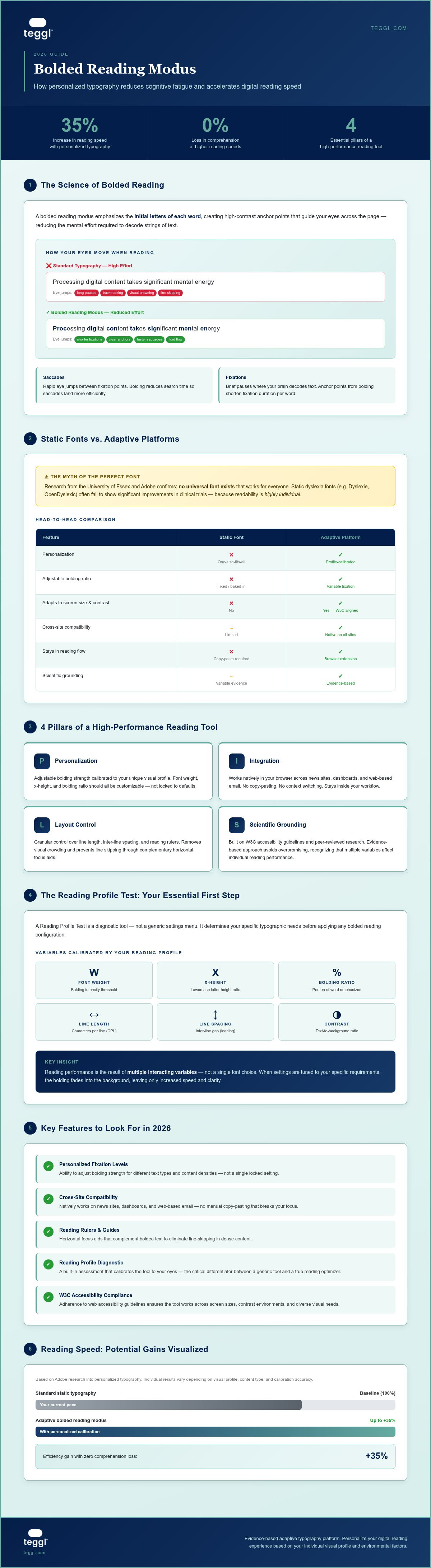
At its core, a bolded reading modus is a sophisticated typographic technique designed to streamline how your brain processes digital text. Instead of presenting every character with equal weight, this method emphasizes the initial letters of each word. This creates high-contrast anchor points that guide your eyes across the page. It's not about changing the content; it's about optimizing the delivery system for your visual cortex. By creating these intentional focal points, the technology allows your brain to recognize words faster, reducing the mental effort required to decode strings of text.
The effectiveness of this method lies in the mechanics of human vision. When you read, your eyes don't move in a smooth line. Instead, they perform a series of rapid jumps called saccades, punctuated by brief pauses known as fixations. Standard web typography often leads to visual crowding, a phenomenon where letters appear to blur or merge, forcing your brain to spend valuable energy "searching" for the start of the next word. Research conducted by Adobe has shown that when typography is personalized to the individual, reading speed can increase by up to 35% without any loss in comprehension. By reducing fixation time, you effectively unlock a faster, more fluid reading experience.
The Myth of the Perfect Font
Many people search for a single "magic" font to solve their reading struggles. However, research from the University of Essex and Adobe confirms that no universal font exists that works for everyone. While static "dyslexia fonts" like Dyslexie or OpenDyslexic were designed with good intentions, they have often failed to show significant improvements in clinical trials. This is because readability is highly individual. What works for one person's visual profile might actually hinder another. True optimization requires an adaptive approach rather than a rigid, one-size-fits-all typeface.
Dynamic Bolding vs. Static Typography
Traditional reading aids often rely on static, "baked-in" bolding that you can't adjust. In contrast, modern browser extensions transform any website's existing text into a dynamic bolded reading modus. This allows for what specialists call variable fixation. Instead of a fixed bolding ratio, you can adjust exactly how much of a word is emphasized based on your immediate needs and environmental factors. This level of control ensures that the text adapts to you, rather than forcing you to adapt to the text, creating a truly seamless and personalized reading environment.
Buying Guide: How to Choose a Bolded Reading Solution
Selecting a bolded reading modus that fits your workflow requires more than just a quick download. It's about finding a cognitive partner that respects your unique visual profile. To avoid digital fatigue, look for a solution built on four essential pillars: personalization, seamless integration, granular layout control, and scientific grounding. Without these, you're simply swapping one rigid display for another, which often leads to the same eye strain you're trying to escape.
The most critical feature in 2026 is a "Reading Profile Test." This isn't a generic settings menu. It's a diagnostic tool that determines your specific typographic needs. While free "copy-paste" converters might seem convenient, they break your focus by forcing you out of your environment. A native browser extension keeps you in the flow of your work, whether you're navigating a news site or a complex spreadsheet. You can discover your own optimal settings by starting with a professional assessment that calibrates the text to your eyes.
Don't let the fear of distraction hold you back. New users often ask if the bolded text will feel jarring. There's a brief adjustment period, but this is usually solved by proper calibration. When settings are tuned to your specific requirements, the bolding eventually fades into the background. This leaves you with only the benefit of increased speed and better clarity. It's not about the software being "loud"; it's about making the information quiet enough for your brain to process without effort.
Key Features to Look For
Personalized Fixation Levels: The ability to adjust bolding strength for different text types and densities.
Cross-Site Compatibility: Ensure the tool works natively on news sites, dashboards, and web-based emails.
Reading Rulers and Guides: Horizontal focus aids that complement bolded text to prevent line skipping.
Static Fonts vs. Adaptive Platforms
Static font downloads are limited because they don't adapt to different screen sizes or contrast ratios. Adaptive platforms like Teggl outperform these because they follow W3C accessibility guidelines and adjust typography in real-time. By choosing a platform rather than a single font, you ensure your reading environment remains consistent and optimized across the entire web. This adaptive approach removes the "visual crowding" that static fonts often ignore.
Maximising Performance with the Teggl Reading Profile
Achieving peak cognitive performance requires more than just turning on a feature. It's about data-driven calibration. The Teggl Reading Profile Test is designed to pinpoint your specific visual needs by measuring your saccadic rhythm. It identifies the precise font weight, x-height, and bolding ratio that allows your brain to process information without the usual friction. By establishing a personalized bolded reading modus, you shift from passive scrolling to active, high-speed comprehension.
Research from the University of Leeds highlights that bolding alone isn't a silver bullet. For maximum efficiency, typography must work in harmony with layout. The study suggests that an optimal line length of approximately 70 characters, combined with generous inter-line spacing, significantly reduces visual stress. When these elements are paired with a calibrated bolded reading modus, the "Z-pattern" of typical digital scanning, where the eye bounces haphazardly across the screen, is replaced by a smooth, linear flow. This transition is what allows you to maintain focus during long-form sessions.
You can also adapt your settings based on the task at hand. For "search-reading," where you need to find specific data points in a sea of text, a higher bolding ratio provides stronger anchor points. For "deep-reading" of complex academic or technical papers, a subtler setting often works better to maintain a calm, steady rhythm. This flexibility ensures your tool works for you, regardless of the content type.
The Role of Layout in Reading Efficiency
Teggl doesn't just bold text; it reconfigures your entire reading environment. By adjusting spacing and contrast alongside the bolding ratio, the platform removes the obstacles that cause mental exhaustion. This is supported by findings from the University of Essex, which show that x-height has a direct impact on comprehension speed. Teggl uses these variables to ensure your text is as legible at the end of a long shift as it was when you first started your day.
Setting Up Your Personalised Reading Environment
Getting started is a straightforward process. First, complete the Reading Profile Test to establish your baseline. Next, apply these results within the Teggl extension to see an immediate transformation of your digital workspace. An Optimal Reading Profile is a data-driven configuration of typography tailored to an individual’s saccadic rhythm.
Take Control of Your Digital Environment
Digital reading shouldn't be a source of exhaustion. Throughout this guide, we've explored how the intersection of visual ergonomics and adaptive typography can fundamentally shift your relationship with text. By moving away from rigid, static fonts and embracing a system that respects your unique saccadic rhythm, you remove the obstacles that lead to skipping lines and losing focus. It's about creating a workspace that empowers your cognitive performance rather than draining it.
Adopting a calibrated bolded reading modus is a practical, evidence-based way to manage information overload. Research shows that personalizing these typographic variables can increase reading speed by up to 35%, making it an essential tool for professionals who spend their days navigating dense web content. Because your privacy is a non-negotiable standard, our browser extension is built with a zero-tracking, privacy-first architecture that keeps your data secure.
Ready to see the difference for yourself? Take the Teggl Reading Profile Test to discover your optimal settings. It's time to experience a reading environment that works with your brain, not against it. You've got the tools to reclaim your focus; start your journey toward effortless reading today.
Frequently Asked Questions
Does bolded reading actually improve comprehension or just speed?
Bolded reading primarily enhances speed by streamlining visual tracking, but this efficiency often leads to better comprehension over long sessions. Since your brain isn't exhausted by the mechanical act of decoding letters, you have more cognitive energy available to process complex ideas. It's about reducing the "tax" on your working memory. By making the decoding process more efficient, you can maintain a higher level of understanding even as you move through text more rapidly.
Can bolded reading tools help people with ADHD or Dyslexia?
These tools serve as an adaptive accessibility aid rather than a clinical cure for ADHD or Dyslexia. Many users with neurodivergent profiles report that the high-contrast anchor points help maintain focus and prevent line skipping. However, scientific research shows that results vary significantly between individuals. It's best to use a Reading Profile Test to see if this specific typography helps your unique visual processing rhythm before committing to a long-term workflow.
What is the difference between generic bolding tools and Teggl’s Bolded Reading Modus?
Standard tools often apply a rigid, one-size-fits-all bolding pattern that doesn't account for individual visual profiles. In contrast, the Teggl bolded reading modus is a fully adaptive system that calibrates itself based on your unique Reading Profile Test results. While basic alternatives might provide a simple static overlay, Teggl optimizes the entire typographic environment, including font weight and spacing, to ensure a frictionless experience that feels natural to your specific eyes.
Will using a bolded reading extension slow down my browser or compromise privacy?
Using a high-quality extension won't slow down your browser because it's designed to be a lightweight, native integration. Teggl prioritizes a privacy-first architecture with zero-tracking, meaning your reading habits and data stay entirely on your local machine. It's a seamless solution that optimizes your environment without compromising your system's performance or your personal security. You get the benefits of a faster reading experience without the technical overhead or privacy risks associated with older tools.



Comments